Billing & Subscriptions
Manage your 5-by-5 subscription plan, payment method, and billing details. Covers what you pay 5-by-5 (subscription) vs. what members pay each other (group billing).
Overview
Two different billing flows exist in 5-by-5 — make sure you know which one you’re thinking about:
| Flow | Who Pays Whom | Covered Where |
|---|---|---|
| 5-by-5 subscription | Your group pays BlueSky Applications for using the app | This page |
| Group internal billing | Members pay your group (or treasurer) for their share of hangar, fuel, hourly time, etc. | Finances + Online Payments |
This page covers the first. 5-by-5 uses Stripe for subscription billing. Solo subscriptions are a flat monthly or annual fee. Club subscriptions are billed per pilot, with a per-aircraft cap — most clubs simply fold this cost into their monthly dues.
Subscription Tiers (US)
Solo Owner Plans
For pilots who own their own airplane:
| Solo Free | Solo | |
|---|---|---|
| Monthly | $0 | $9.99/mo |
| Annual | $0 | $8.25/mo ($99/yr) |
| Maintenance items | 5 max | Unlimited |
| AD auto-import | No | Yes |
| Full currency tracking | No | Yes |
| Tach cascade | No | Yes |
| Squawk photos | No | Yes |
| Flight data prefill (ADS-B + FA) | Yes | Yes |
| AI Assistant | No | Yes |
| EFB integration | Yes | Yes |
| Documents Library | No | Yes |
| Web dashboard | Yes | Yes |
Partnership & Club Plans
One plan for partnerships and flying clubs: Club, with everything included and any number of aircraft.
| Free | Club | |
|---|---|---|
| Monthly | $0 | $6.99/pilot/mo |
| Annual | $0 | $4.99/pilot/mo |
| Aircraft | 1 | Any number (never more than $25/aircraft/mo, annual) |
| Members | Up to 2 | Unlimited |
| Maintenance items | 5 max | Unlimited |
| AD auto-import | No | Yes |
| Calendar sync | No | Yes |
| Full currency tracking | No | Yes |
| Squawk photos | No | Yes |
| Flight data prefill (ADS-B + FA) | Yes | Yes |
| AI Assistant | No | Yes |
| EFB integration | Yes | Yes |
| Online ACH/card payments | No | Yes (via Stripe Connect) |
| Member roles | No | Yes |
| Tach cascade | No | Yes |
| Per-aircraft rates, maintenance & squawks | No | Yes |
| Documents Library | No | Yes |
| Web dashboard | Yes | Yes |
How Club Pricing Works
Club pricing comes down to two numbers: a price per pilot, and a cap per aircraft. There’s no separate charge for each aircraft.
| Annual billing | Monthly billing | |
|---|---|---|
| Per pilot | $4.99/mo | $6.99/mo |
| Cap | Never more than $25 per aircraft/mo | Never more than $35 per aircraft/mo |
Your bill is whichever is lower: pilots × the per-pilot price, or aircraft × the cap. Two examples, on annual billing:
- A partnership — 3 pilots, 1 aircraft: 3 × $4.99 = $14.97, under the $25 cap, so the partnership pays $14.97 a month. Most partnerships simply pay the per-pilot price.
- A flying club — 20 members, 2 aircraft: 20 × $4.99 = $99.80, but the cap is 2 × $25 = $50, so the club pays $50 a month. Once a club hits the cap, its bill stops growing with headcount.
Mechanics don’t count as pilots, and there’s a two-pilot minimum (see How Per-Pilot Billing Works). Annual billing is charged once a year at 12 times the monthly figure.
Adding an aircraft only raises the cap. If your group pays the per-pilot price, adding an aircraft doesn’t change your bill at all. If your group is at the cap, the cap rises by $25 a month on annual billing ($35 monthly), and your bill rises with it, but never above the per-pilot price. In the example above, a third aircraft would take the 20-member club from $50 to $75 a month; it could never go past $99.80. The change is prorated from that day. When adding one on the web Fleet page would change your bill, 5-by-5 shows you the new monthly total (“Adding N123AB changes your Club plan from $X to $Y per month…”) and asks you to confirm before it saves. Removing an aircraft lowers the cap the same way. During a free trial nothing is charged, so there’s no prompt.
Subscription Tiers (Australia)
Australian-based groups (set during onboarding) are charged in AUD at locally appropriate price points:
Solo Owner Plans (AU)
| Solo Free | Solo | |
|---|---|---|
| Monthly | A$0 | A$14.99/mo |
| Annual | A$0 | A$12.42/mo (A$149/yr) |
Club Plan (AU)
| Free | Club | |
|---|---|---|
| Monthly | A$0 | A$10.49/pilot/mo |
| Annual | A$0 | A$7.49/pilot/mo (A$89.88/yr) |
| Cap | — | Never more than A$52.50/aircraft/mo (monthly) or A$37.50/aircraft/mo (annual) |
Same formula as the US plan above, in AUD. A 3-pilot syndicate with one aircraft pays A$22.47 a month on annual billing; 20 members with 2 aircraft pay A$75.
AU pricing is reviewed annually and may also adjust on significant USD/AUD currency moves.
Free Trial
New groups can try Solo or Club free for 60 days — no card required, and nothing is ever charged automatically when it ends.
- Starting a trial. Right after signup, before you’ve even created a group, you’re offered a choice: start a trial, subscribe directly, or stay on the free tier. If you skip it there, it’s also available anytime from Settings → Start Free Trial, as long as you haven’t already used it.
- A group trial is the full Club plan — everything included, and you can add as many aircraft as you like. When you subscribe, your price is worked out from your pilots and aircraft at that point, using the Club formula.
- One trial per person, not per group. Trial eligibility is tied to your email address — even a group you’ve since deleted still counts, so creating a fresh group doesn’t restart the clock.
- Only a group owner or admin can start a trial, and only for a group that doesn’t already have a real Stripe subscription.
- Document scanning is capped at 20 pages during a trial — enough to see how well it reads your own logbooks. The Documents screen shows how many you’ve used. A photographed page counts as one; a multi-page PDF counts by its length. Deleting scanned pages doesn’t give trial pages back. Subscribing removes the cap.
- Reminder emails at 30, 7 and 1 days before the trial ends. Each has a Subscribe Now button that goes straight to secure checkout for that group, with no sign-in needed, so it works on any phone or computer. It offers the plan you’ve been trialing; to see the options, sign in and use Settings → Subscription instead.
- What happens at day 60: if you haven’t subscribed by then, the trial ends exactly like a subscription ending — soft-degrade to the free tier, nothing deleted, no card ever charged since none was collected to begin with.
Upgrading Your Plan
How you pay depends on which plan you’re buying and where you’re buying it.
Solo, on iPhone or iPad
- Go to Settings
- Tap Upgrade Plan
- Pick monthly or annual
- Confirm with Face ID, Touch ID, or your Apple Account password
Solo on an iPhone or iPad is billed through your Apple Account as an in-app purchase, so it shows up with your other App Store subscriptions and on your Apple receipts. Prices appear in your own currency.
Club and Solo on Android or the web
- Go to Settings
- Tap the Upgrade button for your desired plan
- You’ll be taken to a Stripe Checkout page in your browser
- Enter your payment details and confirm
- Your group’s features unlock immediately when you return to the app
Either way, you’ll then be asked to confirm your current tach time and date — this establishes the starting point for 5-by-5’s tach cascade management, which automatically maintains tach continuity across all flights going forward.
Setting up a club on an iPhone? Club is set up and paid for on the website, not in the iPhone app — go to fly5by5.com, create the group and subscribe there, then sign in on your phone and everything's waiting for you. Android has Club and Solo available in the app.
Managing Your Subscription
Where you manage a subscription depends on who’s billing you. Settings shows the right button for your group either way.
If you subscribed through Apple
Settings shows Manage in the App Store, which opens your Apple Account subscription settings. Apple handles renewals, receipts, price changes, cancellations and refunds for these — 5-by-5 can’t change them for you, and there’s no separate payment method to keep up to date here.
If you subscribed through Stripe
- Go to Settings
- Tap Manage Subscription
- This opens the Stripe Customer Portal in your browser
- From there you can:
- Update your payment method
- Switch between monthly and annual billing
- Update the member count if your group size has changed
- View past invoices
- Cancel your subscription
During an active free trial, there's no real Stripe subscription yet, so Manage Subscription shows a Subscribe Now button instead of the Stripe portal — pick a plan and billing period to convert the trial into a paid subscription at any point before it ends.
Cancellation
You can cancel at any time. If Apple bills you, cancel in your Apple Account subscription settings; otherwise use the Stripe Customer Portal. Either way:
- Your paid features remain active until the end of your current billing period
- No further charges will be made after cancellation
- At the end of the period, your group reverts to the free tier
- No data is lost — you keep all your flights, bookings, and records
- You can reverse the cancellation at any time before the end of your billing period — reactivate in the Stripe Customer Portal, or turn renewal back on in your Apple Account settings — and your plan continues as if nothing changed
Refunds on an Apple subscription are requested from Apple directly at reportaproblem.apple.com, not from us. We don't see your payment details for these and can't issue the refund ourselves.
What Happens When Your Subscription Ends
If a subscription isn’t renewed — cancellation ran out its billing period, a card payment failed and Stripe gave up retrying, or a free trial’s 60 days ran out — the group reverts to the free tier. 5-by-5’s philosophy here is soft-degrade, not delete: nothing is ever removed. Every flight, booking, member, and financial record stays exactly as it was; the free tier’s limits (2 members, 1 aircraft, 5 maintenance items) just apply again, the same as any group that started on free.
Reminder emails first. If your subscription is set to cancel (not auto-renewing) rather than lapsing from a failed payment, the group owner gets reminder emails at 30, 7, and 1 days before the period ends — an early nudge before anything actually changes.
Then an immediate cutover — no grace period. The moment the paid period actually ends, the free-tier limits apply right away. There’s no “everything still works for a week” window; the reminder emails are the softening, not a grace period after the fact.
5-by-5 picks who stays “active” on the free tier’s 2-member / 1-aircraft cap, so a group over the limit doesn’t just break:
- Members — the Owner is always kept active. The second active slot goes to (in order): an Admin who also holds a title (e.g. Treasurer), then any Admin, then anyone holding a title, then the earliest-joined remaining member. Mechanics don’t count toward the cap either way.
- Aircraft — whichever airframe has flown the most in the last 90 days wins; ties go to whichever flew most recently, then whichever was added to the group first.
Everyone and everything else stays fully visible — you can still see their profile, flights, and history — but they’re marked “Over free limit” and can’t be assigned to new bookings, flights, or squawks until you renew. On mobile this shows as a small amber pill next to their name on the Members and Flights screens; a lock icon appears on their tab in the aircraft picker.
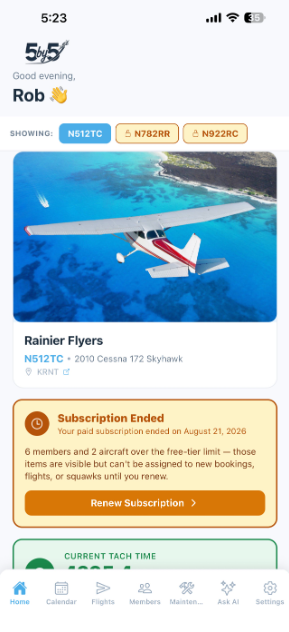
On mobile, a persistent amber banner appears on the Home screen: “Subscription Ended — Your paid subscription ended on [date]. [N] members and [N] aircraft over the free-tier limit — those items are visible but can’t be assigned to new bookings, flights, or squawks until you renew.” Tap Renew Subscription to jump straight to Settings.
On the web dashboard, everything keeps working on the free plan, the same as for any group that started on free. Every page stays open, the group switcher still works, and paid-only features are hidden or locked as usual. An amber banner at the top of each page says when the subscription ended, that your data is all still here, and what renewing brings back. The owner sees a Renew Subscription button in the banner. Everyone else sees a note to ask the club owner to renew.
Renewing: the owner taps Renew Subscription (in the mobile banner or the web banner) or goes to Settings → Subscription. If the group’s Stripe subscription is still attached (for example, it ended after failed card payments), the web button opens the Stripe Customer Portal so you can update the card. If there’s nothing left to reactivate, such as a free trial that ran out or a subscription that was canceled, it takes you to Settings → Subscription to pick a plan. The moment your subscription is active again, the free-tier flags clear automatically and everyone/everything that was marked “Over free limit” becomes fully usable again. No manual cleanup needed.
Choosing who stays active isn't final. If 5-by-5's automatic pick isn't who you'd choose — say, you'd rather keep a different aircraft active while a specific one is down for maintenance — contact support@fly5by5.com and we can override the pick for your group.
How Per-Pilot Billing Works
5-by-5’s Club plan is priced per pilot member (with the per-aircraft cap described in How Club Pricing Works), billed as a single subscription to the group administrator. A few specifics worth knowing:
- Two-pilot minimum. Club bills on a minimum of 2 pilot seats, even if your group is briefly down to one pilot. If you’re a solo owner, the Solo tier is the right pick — Club priced for one would otherwise be more expensive than Solo for less feature value.
- Initial seat count is set from your current pilot-member count at checkout, never fewer than 2.
- Adds and removes prorate automatically. When a pilot or an aircraft joins (or leaves) your group, Stripe adjusts the subscription quantity on a prorated basis — no need to redo checkout or manually adjust the seat count. The change shows up on your next invoice.
- Mechanics don’t count as paid seats. They have role-restricted access (maintenance, squawks, documents) and are excluded from the seat-sync calculation.
- Placeholder members don’t count either until they’re claimed by a real signup — see web-flights → Pilots not yet in your group.
- Most clubs include the per-member cost as a line item in their monthly member dues — the Fixed Expense Items breakdown is a clean way to surface it so members see what they’re funding.
Subscription Email Receipts
Stripe sends subscription receipts directly. These come from stripe.com, not billing@fly5by5.com. The billing@ sender is for internal group billing (member invoices and payment receipts), not 5-by-5 subscription receipts.
If you’re not seeing Stripe receipts for your subscription, check your spam folder — first emails from a new domain usually need to be marked Not Spam once.
Promo Codes
5-by-5 offers a 15% discount to clubs registered with the AOPA Flying Club Network. Contact support@fly5by5.com with proof of your club’s AOPA registration to request a promo code, then enter it during checkout on the Stripe payment page.
If you represent another aviation organisation (flight school, type club, EAA chapter) and think a partnership discount would make sense, drop us a line at the same address — we’re open to discussion.
Refund Policy
Subscription payments are generally non-refundable. If you believe you’ve been charged in error, contact support@fly5by5.com within 14 days of the charge for a review.
If BlueSky Applications terminates your account without cause, any prepaid subscription fees are refunded on a prorated basis.
Related Pages
- Online Payments — how your group’s members pay their monthly invoices via ACH or card
- Finances — internal group billing, posting bills, the ledger
- Email Notifications — every email 5-by-5 sends and how to allow-list senders