Aircraft & Engine Logbooks

Your paper logbooks, searchable in seconds.

Scan each page with your phone and 5-by-5 reads it — handwriting and mechanic shorthand included. Every entry becomes searchable, and the AI Assistant can answer questions straight from your logs instead of you paging through binders.

  • Airframe, engine, and propeller logbooks, plus invoices and manuals
  • Reads handwriting and standard maintenance shorthand, and marks anything illegible instead of guessing
  • Each page's photo side by side with its text — correct any entry by hand
  • Add or replace pages anywhere as your logbooks grow
  • PDFs and other documents you upload are searchable the same way
  • Ask things like "When was the ELT battery last replaced?"
  • Your A&P can read the logbooks too — just the logbooks, not your invoices or other files
  • Included in Solo — the free trial includes 20 scanned pages
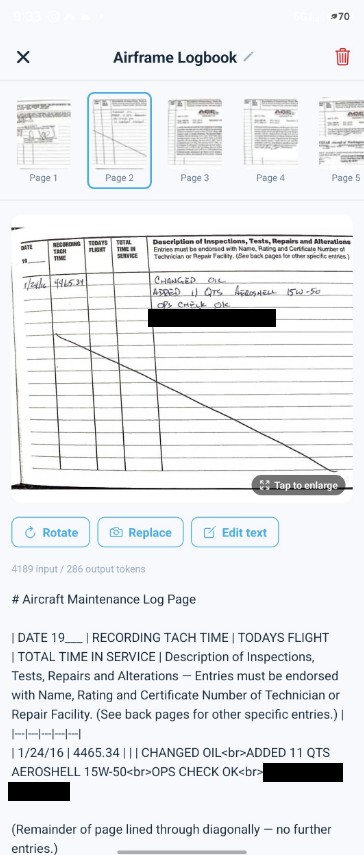
Logbook viewer showing a scanned maintenance logbook page above its transcribed text
Maintenance

Never miss an oil change. Or an airworthiness directive.

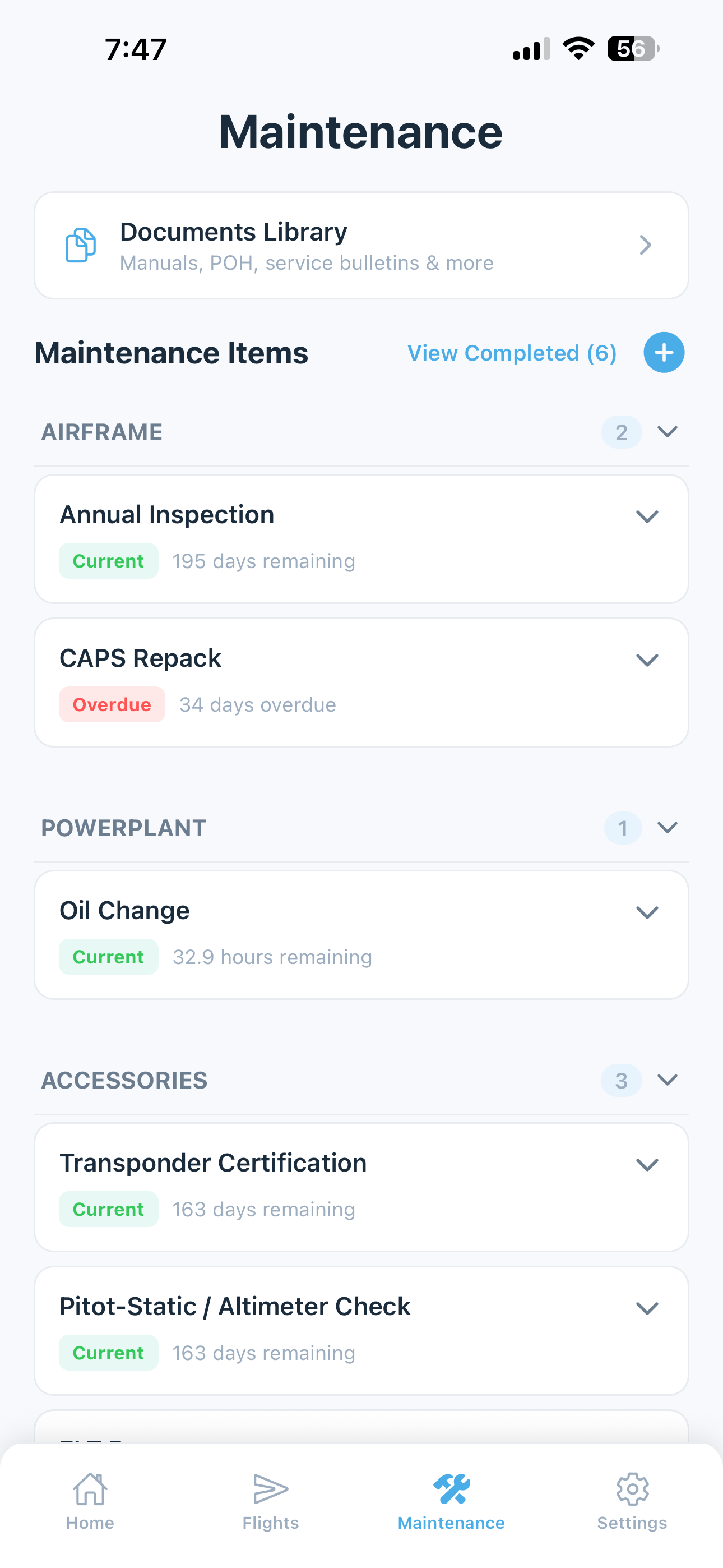
Track every maintenance item with automatic due dates based on calendar time, tach hours, or both. Add your A&P and they get the views they need — and nothing they don't.

  • Annuals, 100-hour inspections, oil changes, ADs, transponder, ELT, and more
  • Due by date, tach hours, or both — alerts when an item is within 10 hours or 10 days
  • AD auto-import — new Airworthiness Directives fetched automatically for your aircraft
  • Time-limited component tracking for engines, propellers, and other life-limited parts
  • Oil analysis history, with lab reports imported straight from the PDF
  • Your A&P or IA gets their own login to your maintenance records, squawks, and scanned logbooks, and can mark items complete — with no access to your costs or your other documents
  • Completion history with date, tach, and notes for every item
Watch the Maintenance Tracking walkthrough Watch the Mechanic access walkthrough
Maintenance tracking with due dates, components, and AD status
Costs

Know what your airplane really costs to fly.

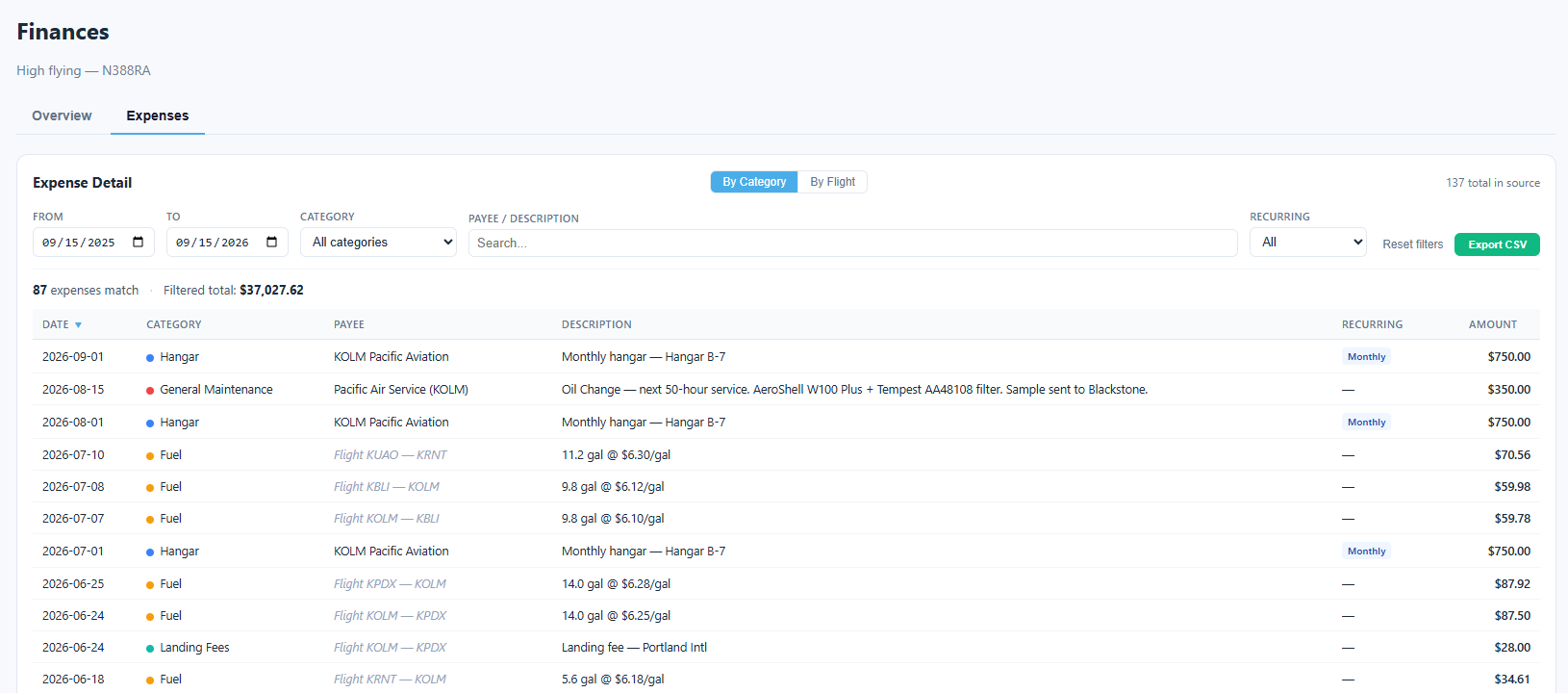
Plan the fixed costs — insurance, hangar, reserves — log fuel and fees with each flight, and see what every month and every flight actually cost.

  • Planned and recurring expenses: insurance, hangar, subscriptions, engine and annual reserves
  • Fuel, oil, landing fees, and hangar logged with the flight they belong to
  • Expenses by category, or flight by flight, on the web dashboard
  • A month-by-month chart of what you've spent and what's coming
  • Connect your bank to see your balance and actual spending next to the plan
  • Export everything to CSV for taxes, insurance, or your own spreadsheets
Web dashboard Expenses tab listing hangar, fuel, and landing-fee costs by category, with recurring hangar rent marked monthly
Flights & Currency

Prefill the flight. Just confirm and save.

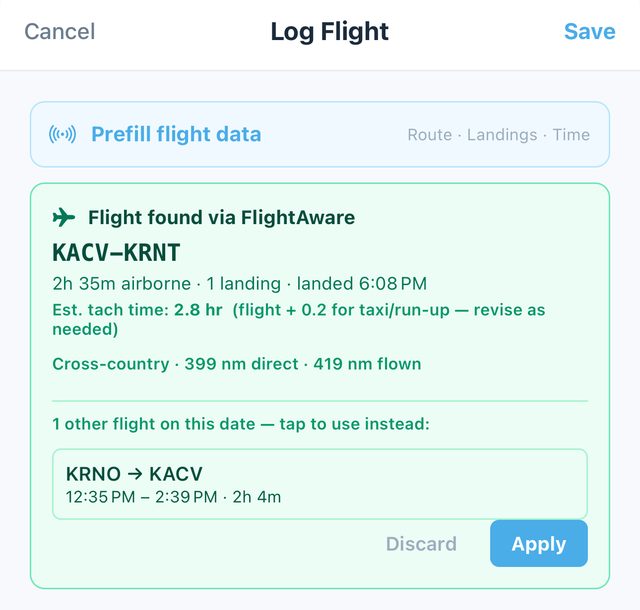
Tap Prefill flight data in the app and 5-by-5 finds your flight in FlightAware's tracking — route, landings, time in the air, and an estimated tach time — so logging a flight takes seconds. Your FAA currency updates from every flight you log.

  • Route, landings, and flight time filled in from FlightAware tracking, with an estimated tach time you can adjust
  • Cross-country flights detected automatically, with distance direct and flown
  • Flew more than one leg that day? Pick the one you're logging
  • Tach cascade — insert or correct flights anywhere without breaking continuity
  • Day, night, and instrument currency from your logged flights, built on the FAA 14 CFR 61 rule set
  • Medical, flight review, and tailwheel expirations, with Color-coded Current / Warning / Expired status
  • Full history and FlightAware track data on the web dashboard
Watch the Logging Flights walkthrough
Log Flight screen with a flight found via FlightAware — route, time airborne, landings, and estimated tach time ready to apply
Better Together

It adds up when it's all in one place.

Your logbooks, maintenance, squawks, oil analysis, flights, and costs live side by side — so the AI Assistant can answer questions no single-purpose app can. Answers point back to the logbook page they came from, so you (or your A&P) can check them.

"Give me a summary of the state of my engine."

Engine logbookOil analysisSquawksADsMaintenance

Overhaul details, oil trends since, recent fixes, and what's coming due — each tied back to the logbook entry it came from. For one owner, it also caught that the app's TBO setting didn't match what the overhaul shop wrote in the logbook.

"When was the ELT battery last replaced, and when is it due?"

LogbooksMaintenance tracking

The replacement entry from your scanned logs, next to the due date you're already tracking.

"How has my oil analysis trended since the overhaul?"

Oil analysisEngine logbookFlights

Wear metals sample by sample, alongside the hours flown since the work that matters.

"What did I spend on maintenance this year?"

ExpensesMaintenanceLogbooks

Your totals, with the work behind them.

Also included

Squawk reporting

Minor, Monitor, or Grounding — with photos, resolution history, and a home-screen alert for anything grounding.

Squawk walkthrough
130+ manuals library

POHs, maintenance and overhaul manuals, and avionics guides for common GA aircraft and engines — bookmark yours and the AI can read them too.

Documents Library walkthrough
Weather at your field

Current conditions for your home airport on the home screen, plus a lookup for anywhere you're headed.

Included on Every Plan

Go deeper with the web dashboard.

Available on Solo Free too, the web dashboard gives you full-screen analytics, financial insights, maintenance trends, and FlightAware track data — all exportable for deeper analysis. The Solo paid plan adds the AI Assistant and logbook scanning, plus unlimited maintenance items, full currency tracking, tach cascade, and more, on both mobile and web.

Maintenance Dashboard

Your scanned logbooks, component history, oil analysis trends, and full AD compliance tracking.

Financial Insights

Costs by category or by flight, cash flow, and expense planning.

Flight Analytics

Month-by-month trends, full history, and FlightAware track data for every flight.

Data Exports

Download any dataset as CSV for tax prep, insurance, or your own analysis.

Learn more about the Web Dashboard

Try Solo free.

Start with the free tier, or try every Solo feature free for 60 days, including logbook scanning and the AI Assistant. No credit card either way.