Scheduling

Who has the airplane? One look tells you.

Book the airplane in a couple of taps and see at a glance who has it: each partner in their own color, a bar for part of a day, a filled day for all of it. When it's in the shop, everyone booked that week hears about it.

  • Full-day or timed bookings, synced to Google Calendar or Outlook
  • Planned maintenance on the calendar, with affected bookings put on standby
  • Turn a booking into a logged flight in one tap, with FlightAware filling in the route and times
  • Currency for every partner: landings, instrument, medical and flight review
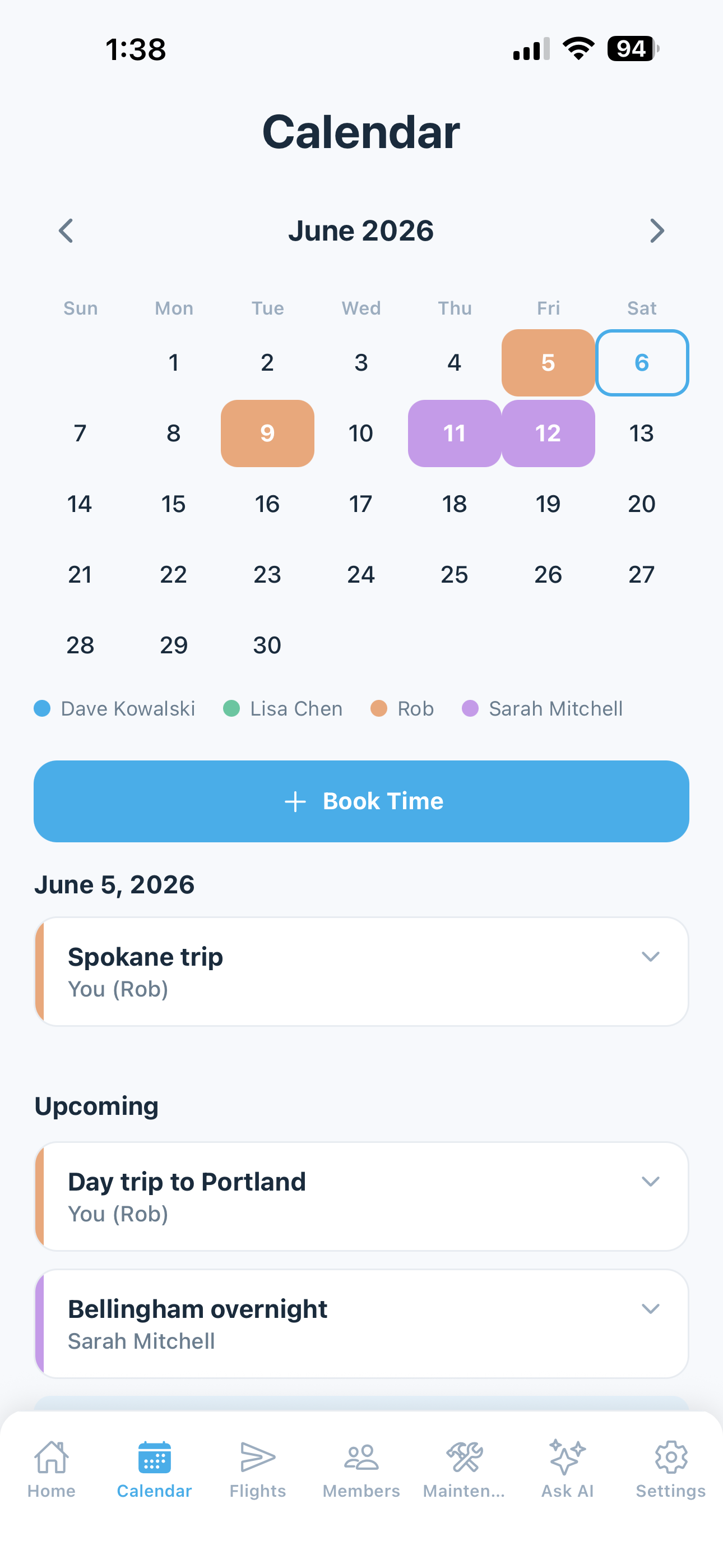
Calendar with each partner's bookings in their color and a maintenance window
Costs & Invoices

One simple bill a month. Nobody does the math.

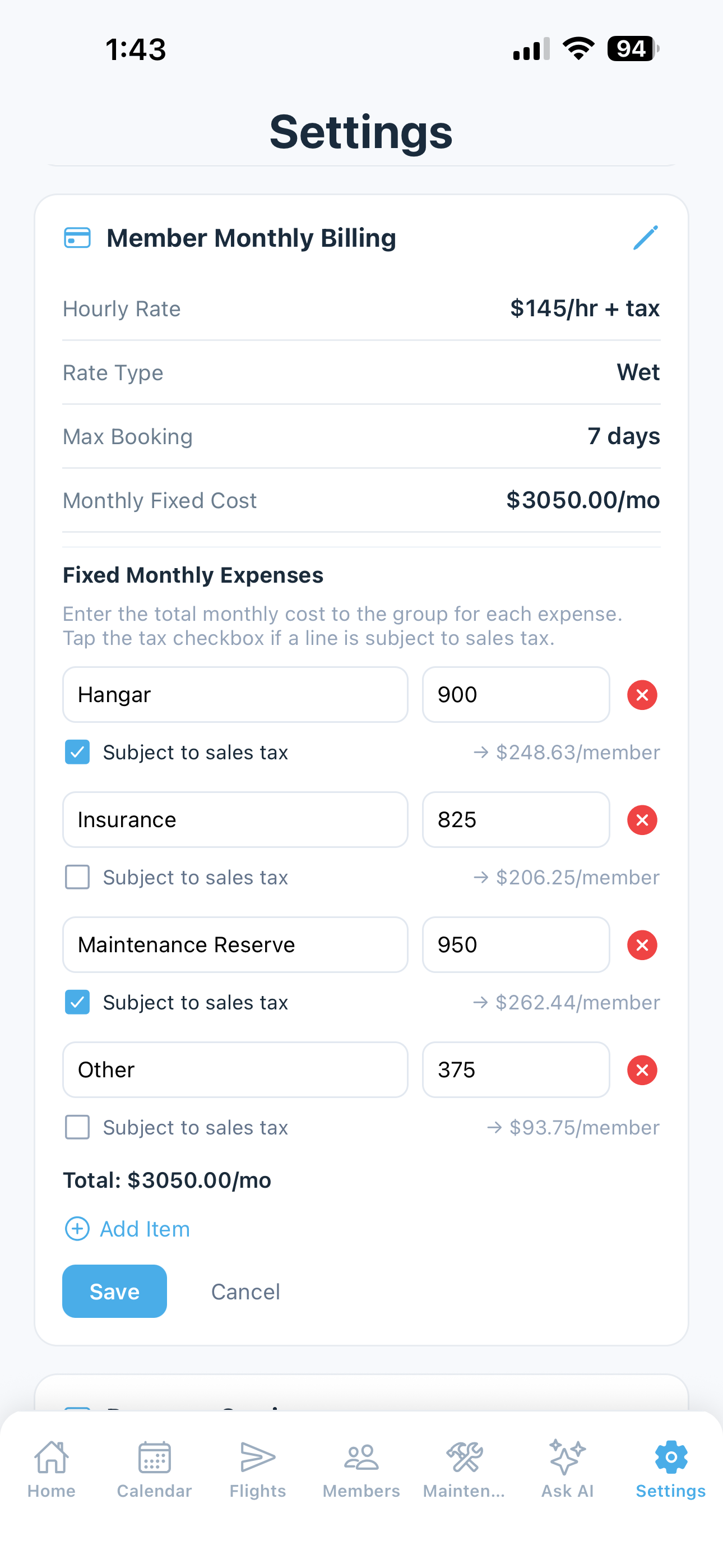
Set the hourly rate and the fixed costs once: the hangar, insurance, reserves, the loan if there is one. At month end each partner gets an invoice built from their own flying and their share of the rest, and pays it online.

  • Invoices from Hobbs or tach time, plus each partner's share of fixed costs and shared expenses
  • Paid by card or bank transfer through Stripe, straight into the partnership's account, or Venmo, PayPal or Zelle
  • Payments post to the ledger on their own, and overdue invoices get an automatic reminder
  • Fuel bought on the road, reimbursed on the next invoice
  • Bank sync: the partnership's account imports and matches transactions
Watch the Billing & Payments walkthrough
Monthly billing settings: hourly rate, fixed expenses and each member's cost preview
The Numbers

Everyone sees the same numbers.

Most partnership friction is about money nobody can quite see. In 5-by-5 every partner sees their own balance on the home screen, and the whole partnership sees where the money went: what was spent, what's planned, and what each airplane-hour really costs.

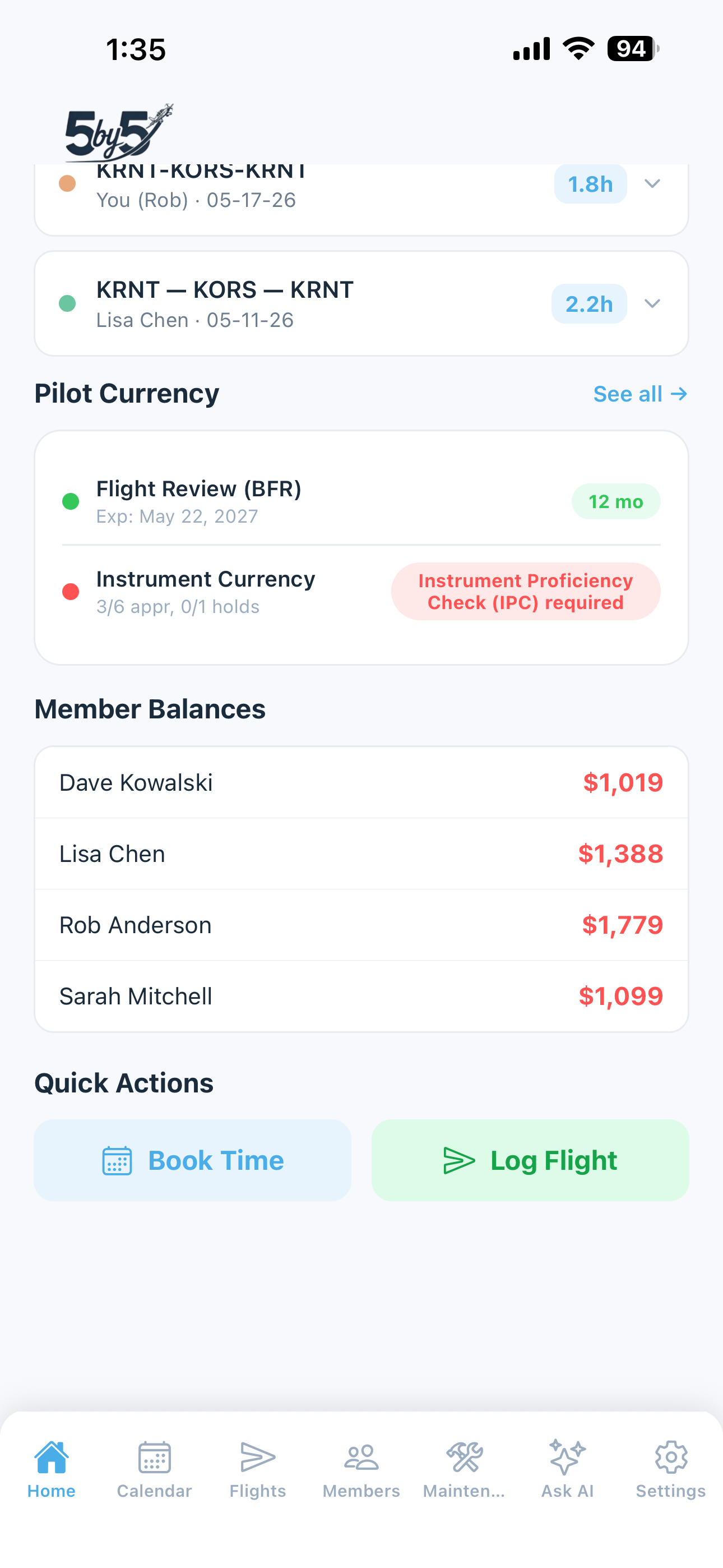
  • Each partner's balance and recent invoices on their home screen
  • Every expense by category, with the flight it belongs to
  • Planned expenses (the annual, the engine fund) against what was actually spent
  • A running ledger per partner, exportable as CSV for your accountant
Home screen with member balances and recent flights
Maintenance

One maintenance record, not three memories.

Whoever took it to the shop last, everyone knows what's due and what was done. Squawks reach every partner the moment they're filed, and a grounding one says so in red on everyone's home screen.

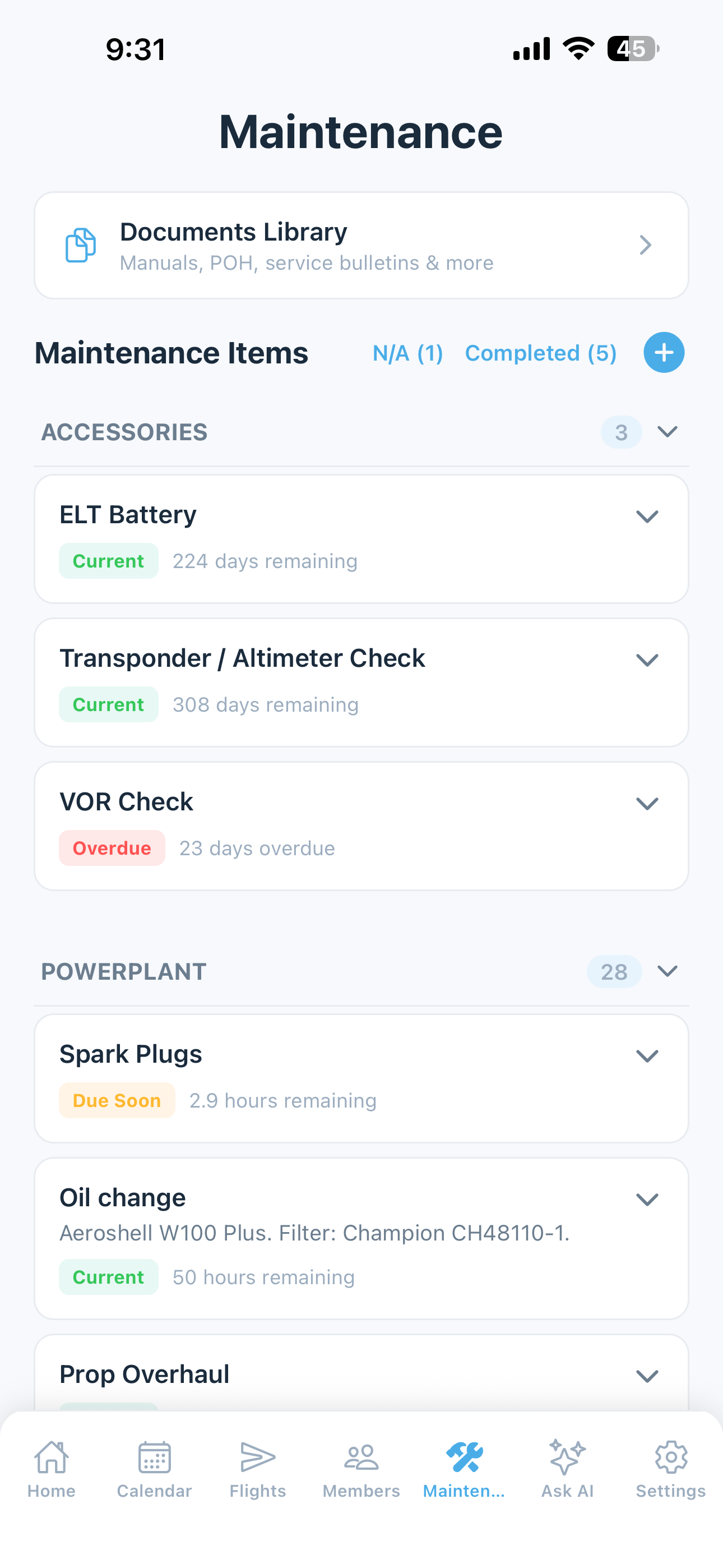
  • Annuals, oil changes, ADs, transponder, ELT and anything recurring, by date or hours
  • AD auto-import from the FAA
  • Squawks with photos, emailed to the whole partnership, with a notice when they're fixed
  • Oil analysis history, including Blackstone and AOA reports read in for you
  • Your A&P can update records directly, and sees maintenance only
Maintenance with color-coded status for annuals, ADs and inspections
Aircraft & Engine Logbooks

The logbooks, in every partner's pocket.

Scan the airframe, engine and propeller logbooks once and they're searchable by everyone, not sitting in one partner's flight bag.

  • Scanned page by page from a phone; handwriting and mechanic shorthand become searchable text
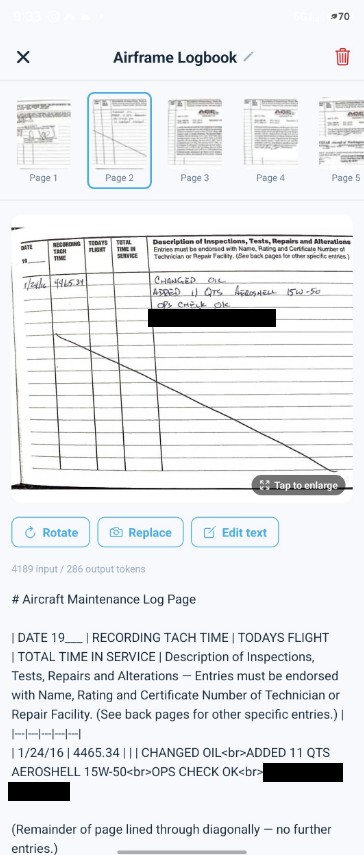
  • Each page's photo beside its text, and anything misread can be corrected by hand
  • Your A&P can read the logbooks, and only the logbooks
  • The free trial includes 20 scanned pages
Logbook viewer showing a scanned maintenance logbook page above its transcribed text
Ask AI

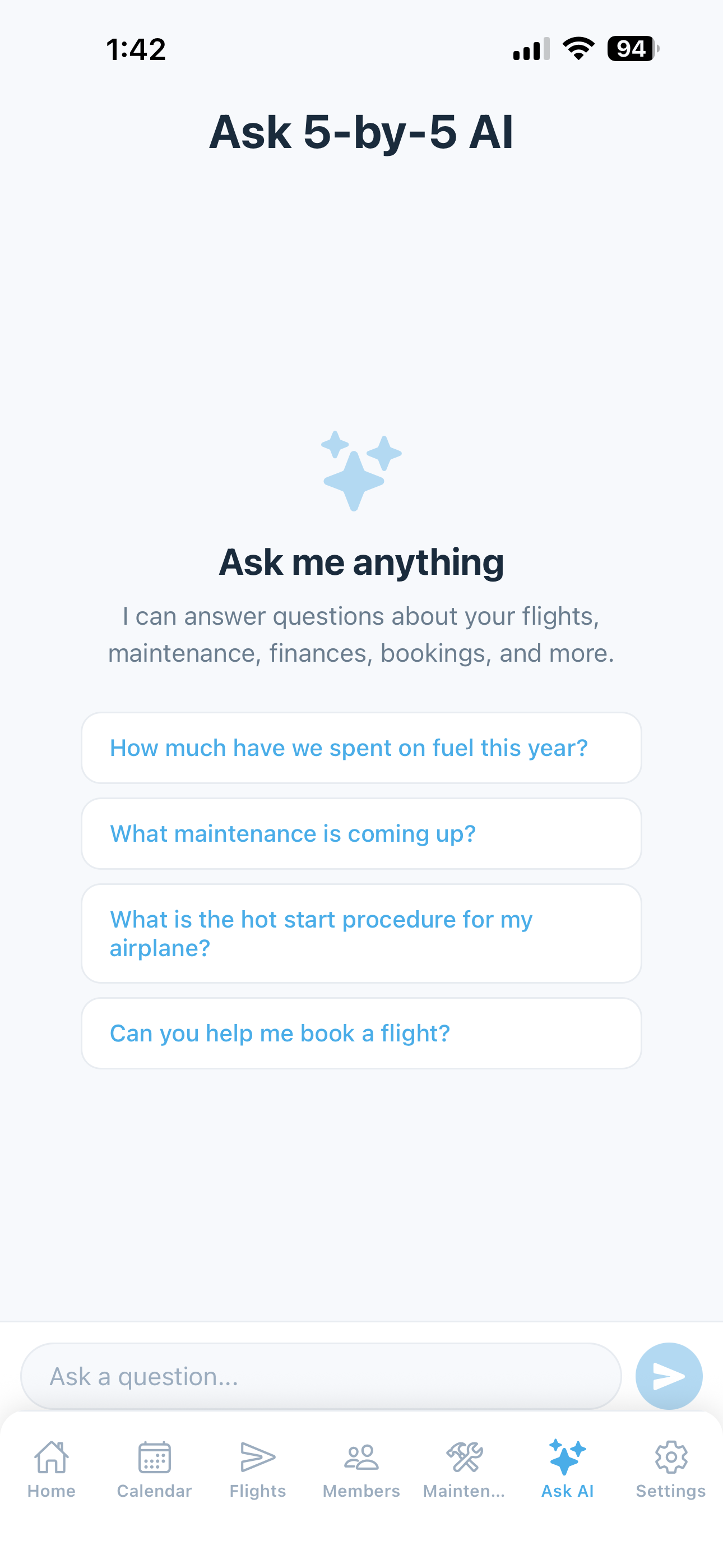
Ask anything. Get answers from your own records.

The AI Assistant reads everything your partnership keeps in 5-by-5 (the scanned logbooks, maintenance, oil analysis, squawks, flights and the books) and answers in plain English, pointing back to the logbook page it used. Nothing comes from the internet, and nobody outside the partnership sees it.

  • One question can draw on logbooks, maintenance, oil analysis, flights and costs at once
  • Bookmark your airplane's POH from the 130+ manual library and ask procedure questions
  • Book, move or cancel a reservation by just asking, with a preview before anything changes
  • Ask by voice or text, on the phone or the web
  • Members only ever see their own money; owners, admins and the treasurer see everyone's
Watch the AI Assistant walkthrough
Ask AI conversation with suggested questions
Better Together

It adds up when it's all in one place.

Because the logbooks, maintenance, flights and money live side by side, you can ask questions no single-purpose app can answer.

"Give me a summary of the state of our engine."

Engine logbookOil analysisSquawksADsMaintenance

The overhaul entry, oil trends since, recent fixes and what's coming due, each tied back to the logbook page it came from.

"How much has each of us flown this year, and what do we owe?"

FlightsInvoicesLedger

Hours and balances side by side, so the partner meeting starts from the same numbers.

"What did we spend on maintenance this year compared with last?"

ExpensesMaintenanceLogbooks

The totals, with the work behind them.

"Is the plane free Saturday? Book it for me, 9 to 5."

CalendarBookings

It checks for conflicts and maintenance, shows you the booking, and saves it when you say so.

Web Dashboard

The whole picture, on a big screen.

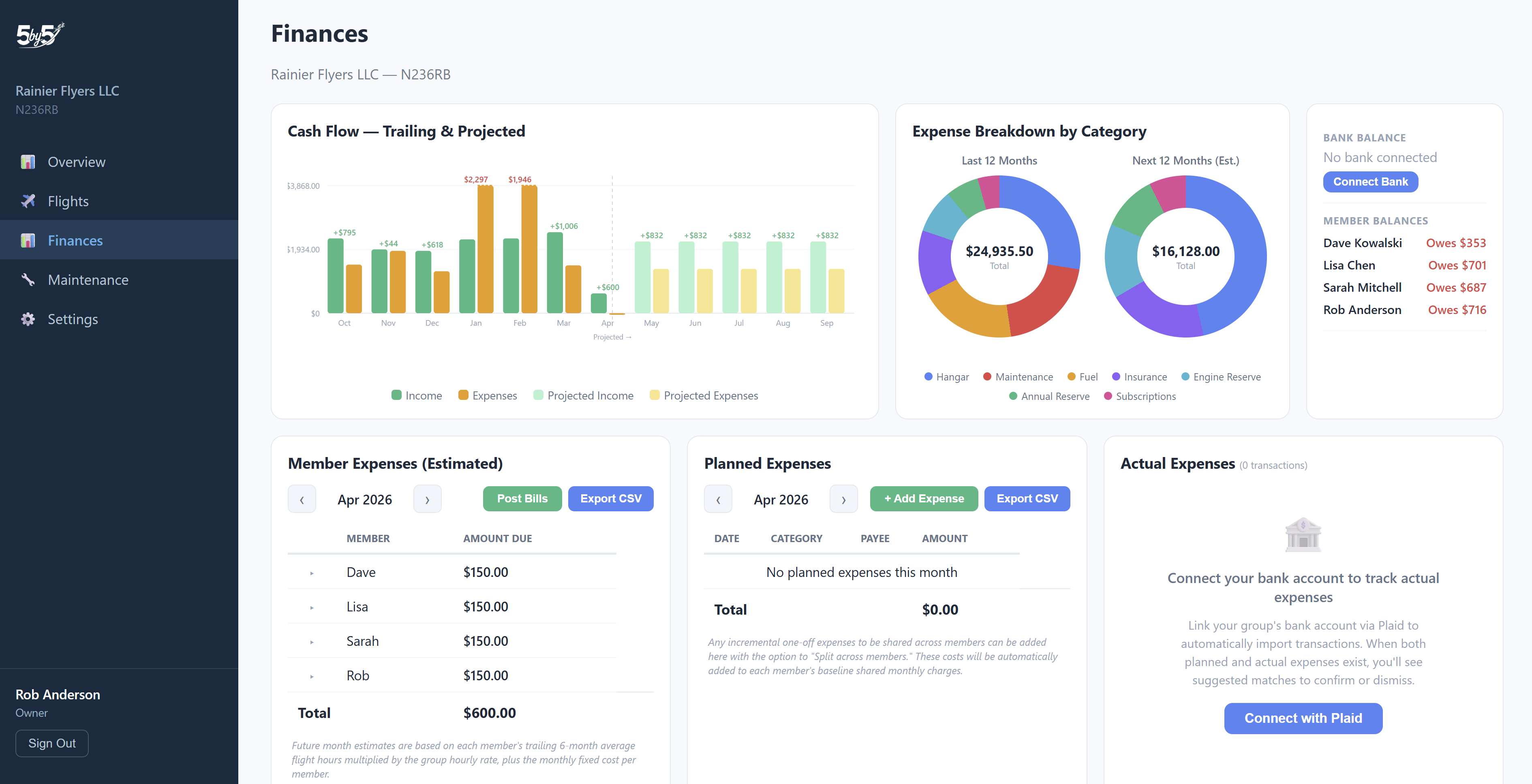
Every partner gets the web dashboard too: the money, the maintenance and the flying laid out in full, for the month-end look or the annual-time planning.

  • Finances: cash flow, expenses by category and by flight, planned against actual, billing history
  • Maintenance: what's due, component and engine hours, oil analysis trends, AD compliance
  • Flights: the calendar, FlightAware tracks, and each partner's hours over time
  • Settings, billing and members, with every dataset exportable as CSV
Tour the web dashboard →
The Finances page on the web dashboard: cash flow, expenses and billing

Common questions

How does 5-by-5 split costs between partners?

Each partner gets a monthly invoice built from their own flight time (Hobbs or tach), their share of the fixed costs like the hangar, insurance and reserves, and any shared expenses. You set the hourly rate and the fixed costs once; the invoices are emailed automatically, and the ledger keeps a running balance for everyone.

Do we need to be an LLC?

No. 5-by-5 works the same for an LLC, a co-ownership agreement or a handshake. It keeps the shared books and the shared records; how you own the airplane is up to you.

How do partners pay?

By card or bank transfer through Stripe, straight into the partnership's own account, or by Venmo, PayPal or Zelle if you list them on the invoice. Payments reconcile in the ledger on their own, and overdue invoices get an automatic reminder, so nobody has to be the one who chases.

We run it on a spreadsheet today. What moves over?

Most of your history: past flights import from a spreadsheet or from ForeFlight or Garmin Pilot logbook exports, and past charges and payments import into the ledger from a CSV. Paper logbooks can be scanned from a phone.

What happens when a partner sells their share?

Remove them and their access ends, but their flights, invoices and payments stay in the partnership's records, and the new partner joins with an invite link. Ownership of the partnership's account can be handed over too.

How much does it cost?

$4.99 per pilot per month on the annual plan, so a 3-pilot partnership pays $14.97 a month, and it never goes above $25 per airplane per month. Groups of two can use the free plan, and every feature is free for 60 days with no credit card.

Try it with your partners.

Every feature free for 60 days, no credit card. Set up the airplane, invite your partners, and let the first month's invoices show you how it works.